Shooting for Success: Analyzing NBA Player Performance and Value πŸ€

Author

Jake Starkey

Introduction

Background πŸ’»

Basketball is a data-rich sport where player performance directly impacts team success. Understanding key statistics can help teams make better decisions about player value, game strategy, and resource allocation. This project dives into the 2022-23 NBA player dataset to uncover insights that could influence team building and player development.

Statement of the Project Interest

The goal of this project is to analyze the relationship between player performance metrics (offensive and defensive) and their salaries. We aim to identify what stats correlate most with high salaries and whether there are undervalued players based on their contributions.

Data Storytelling πŸ“–

Questions and Objectives

  1. What performance metrics are most strongly correlated with player salaries?
  2. Are there any undervalued players based on performance statistics?
  3. How do offensive and defensive metrics compare in their influence on salary?
  4. What patterns emerge among players with high Player Efficiency Ratings (PER) and Win Shares (WS)?
  5. How does a player’s. scoring efficiency (True Shooting Percentage) compare to their salary?

Data Transformation and Descriptive Statistics

To prepare the data and highlight key takeaways, we performed the following steps:

Data Cleaning

# Load necessary libraries
library(tidyverse)
Warning: package 'ggplot2' was built under R version 4.5.2
── Attaching core tidyverse packages ──────────────────────── tidyverse 2.0.0 ──
βœ” dplyr     1.1.4     βœ” readr     2.1.5
βœ” forcats   1.0.1     βœ” stringr   1.5.2
βœ” ggplot2   4.0.1     βœ” tibble    3.3.0
βœ” lubridate 1.9.4     βœ” tidyr     1.3.1
βœ” purrr     1.1.0     
── Conflicts ────────────────────────────────────────── tidyverse_conflicts() ──
βœ– dplyr::filter() masks stats::filter()
βœ– dplyr::lag()    masks stats::lag()
β„Ή Use the conflicted package (<http://conflicted.r-lib.org/>) to force all conflicts to become errors
# Load the NBA dataset
nba_players <- read_csv("http://bcdanl.github.io/data/nba_players.csv")
Rows: 467 Columns: 51
── Column specification ────────────────────────────────────────────────────────
Delimiter: ","
chr  (3): PlayerName, Position, Team
dbl (48): Salary, Age, GP, GS, MP, FG, FGA, FG_pct, 3P, 3PA, 3P_pct, 2P, 2PA...

β„Ή Use `spec()` to retrieve the full column specification for this data.
β„Ή Specify the column types or set `show_col_types = FALSE` to quiet this message.
# Data cleaning: Remove outliers and invalid entries
nba_players_clean <- nba_players %>%
  filter(!is.na(Salary) & Salary > 0 & GP > 10) %>%  # Remove players with missing or zero salary, and low game participation
  mutate(Salary_Millions = Salary / 1e6)  # Convert salary to millions for easier readability

Findings: This cleaning ensures our analysis focuses on active players with meaningful contributions, avoiding noise from incomplete or irrelevant data points.


Key Summary Statistics

The following code calculates averages for key metrics like salary, points per game (PTS), Player Efficiency Rating (PER), and Win Shares (WS).

# Calculate key descriptive statistics
summary_stats <- nba_players_clean %>%
  summarize(
    avg_salary = mean(Salary_Millions),
    median_salary = median(Salary_Millions),
    avg_pts = mean(PTS),
    avg_per = mean(PER),
    avg_ws = mean(WS)
  )

print(summary_stats)
# A tibble: 1 Γ— 5
  avg_salary median_salary avg_pts avg_per avg_ws
       <dbl>         <dbl>   <dbl>   <dbl>  <dbl>
1       9.55          4.63    9.96    13.7   2.69

Findings: The calculated averages provide a baseline for comparing individual players. For example: - Average salary: $9.55 million - Average points per game: 9.96 points

These values help identify outliers and standout players.


Correlation Analysis

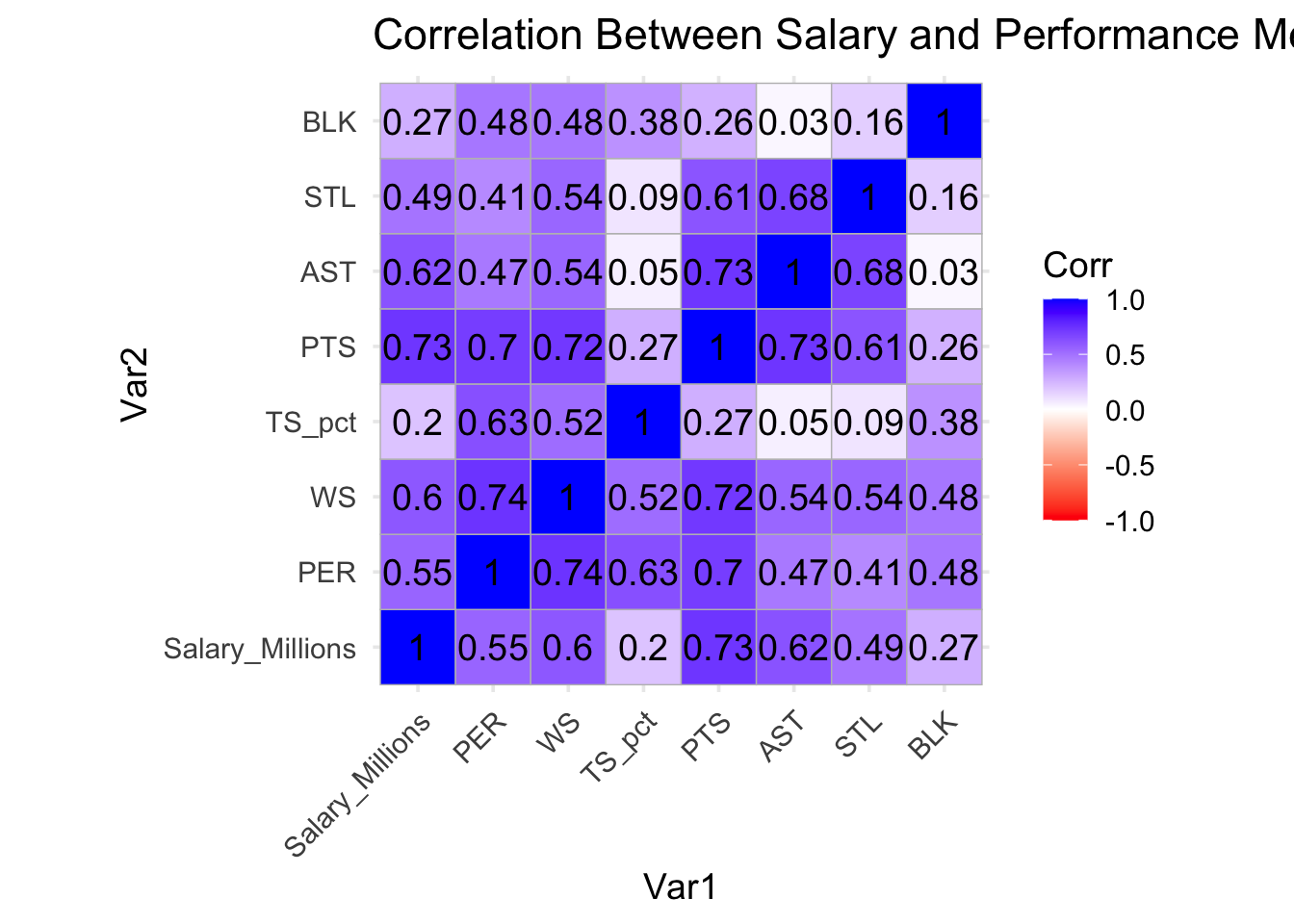
This code computes the correlation matrix to explore relationships between salary and performance metrics. Higher correlations indicate stronger relationships.

# Compute correlations between salary and performance metrics
correlation_matrix <- nba_players_clean %>%
  select(Salary_Millions, PER, WS, TS_pct, PTS, AST, STL, BLK) %>%
  cor()
print(correlation_matrix)
                Salary_Millions       PER        WS     TS_pct       PTS
Salary_Millions       1.0000000 0.5456509 0.5970353 0.20168943 0.7292814
PER                   0.5456509 1.0000000 0.7409330 0.63499002 0.7011657
WS                    0.5970353 0.7409330 1.0000000 0.51919903 0.7221934
TS_pct                0.2016894 0.6349900 0.5191990 1.00000000 0.2745762
PTS                   0.7292814 0.7011657 0.7221934 0.27457624 1.0000000
AST                   0.6161033 0.4725905 0.5426286 0.04748020 0.7325362
STL                   0.4874090 0.4118194 0.5429013 0.09145927 0.6069206
BLK                   0.2743947 0.4826649 0.4754230 0.38408129 0.2574327
                       AST        STL        BLK
Salary_Millions 0.61610328 0.48740903 0.27439469
PER             0.47259052 0.41181939 0.48266485
WS              0.54262859 0.54290135 0.47542296
TS_pct          0.04748020 0.09145927 0.38408129
PTS             0.73253620 0.60692061 0.25743267
AST             1.00000000 0.68220450 0.02631061
STL             0.68220450 1.00000000 0.15878444
BLK             0.02631061 0.15878444 1.00000000

Findings: Metrics like PTS, AST, PER, and WS are likely to show strong correlations with salary, suggesting they are key indicators of player value.


Data Visualization

Salary Distribution

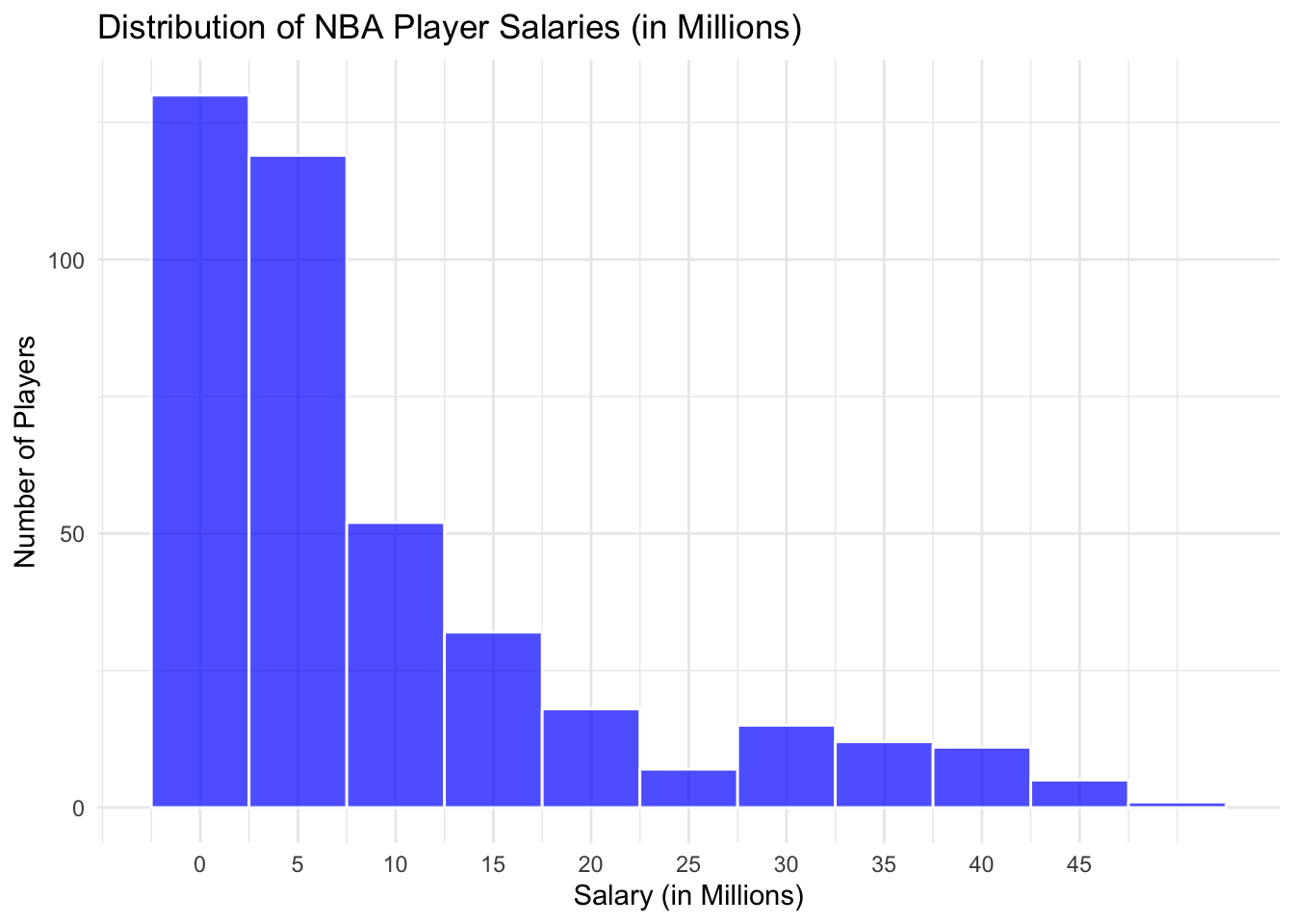
This histogram shows how player salaries are distributed across the league, emphasizing the disparities between top earners and the rest.

library(ggplot2)

# Histogram of salary distribution
salary_plot <- ggplot(nba_players_clean, aes(x = Salary_Millions)) +
  geom_histogram(binwidth = 5, fill = "blue", color = "white", alpha = 0.7) +
  labs(title = "Distribution of NBA Player Salaries (in Millions)",
       x = "Salary (in Millions)",
       y = "Number of Players") +
  scale_x_continuous(breaks = seq(0, max(nba_players_clean$Salary_Millions), by = 5)) +
  theme_minimal()

print(salary_plot)

Findings: Most players earn less than $10 million per season, with a few outliers earning significantly more.


Correlation Heatmap

This heatmap visualizes the strength of relationships between salary and various performance metrics.

library(ggcorrplot)

heatmap_plot <- ggcorrplot(correlation_matrix, 
                           lab = TRUE, 
                           lab_size = 5,
                           colors = c("red", "white", "blue"),
                           title = "Correlation Between Salary and Performance Metrics")
Warning: `aes_string()` was deprecated in ggplot2 3.0.0.
β„Ή Please use tidy evaluation idioms with `aes()`.
β„Ή See also `vignette("ggplot2-in-packages")` for more information.
β„Ή The deprecated feature was likely used in the ggcorrplot package.
  Please report the issue at <https://github.com/kassambara/ggcorrplot/issues>.
heatmap_plot + 
  theme_minimal(base_size = 14) +
  theme(aspect.ratio = 1,
        axis.text.x = element_text(angle = 45, vjust = 1, hjust = 1))

Findings: Strong correlations between salary and metrics like PTS PER, WS, and AST suggest these are key drivers of player compensation.


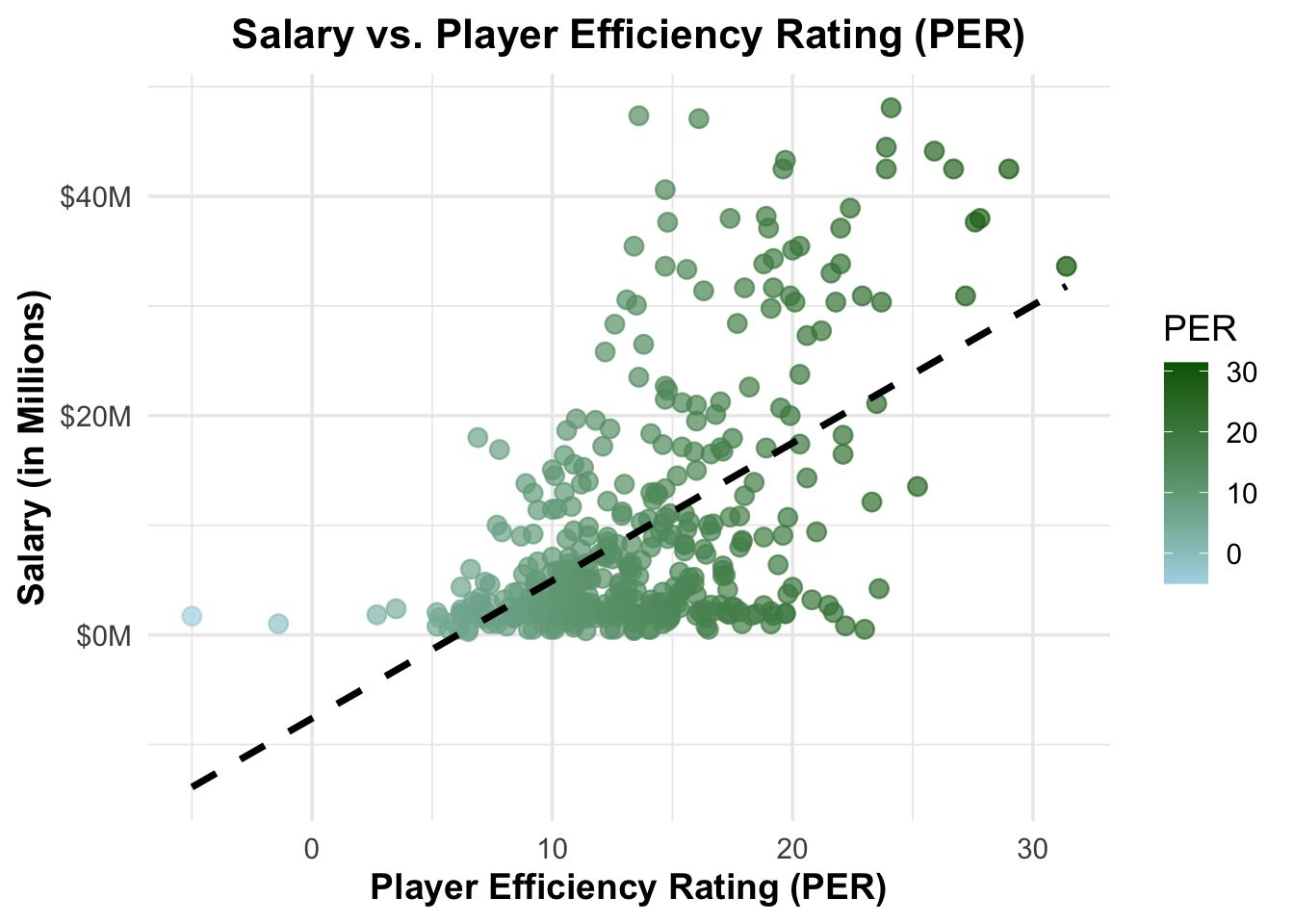
Scatterplot of Salary vs. PER

library(scales)

Attaching package: 'scales'
The following object is masked from 'package:purrr':

    discard
The following object is masked from 'package:readr':

    col_factor
scatter_salary_per <- ggplot(nba_players_clean, aes(x = PER, y = Salary_Millions, color = PER)) +
  geom_point(alpha = 0.7, size = 3) +
  geom_smooth(method = "lm", se = FALSE, color = "black", linetype = "dashed") +
  scale_color_gradient(low = "lightblue", high = "darkgreen") +
  labs(
    title = "Salary vs. Player Efficiency Rating (PER)",
    x = "Player Efficiency Rating (PER)",
    y = "Salary (in Millions)",
    color = "PER"
  ) +
  scale_y_continuous(labels = dollar_format(prefix = "$", suffix = "M")) +
  theme_minimal(base_size = 14) +
  theme(
    plot.title = element_text(face = "bold", size = 16, hjust = 0.5),
    axis.title.x = element_text(face = "bold"),
    axis.title.y = element_text(face = "bold")
  )

print(scatter_salary_per)
`geom_smooth()` using formula = 'y ~ x'

Findings: Some players are shown with high PER have relatively low salaries, highlighting potential undervalued players. This means that they are highly efficient yet are paid lower than they deserve.


Top 10 Players by Win Shares ⛹️‍♂️

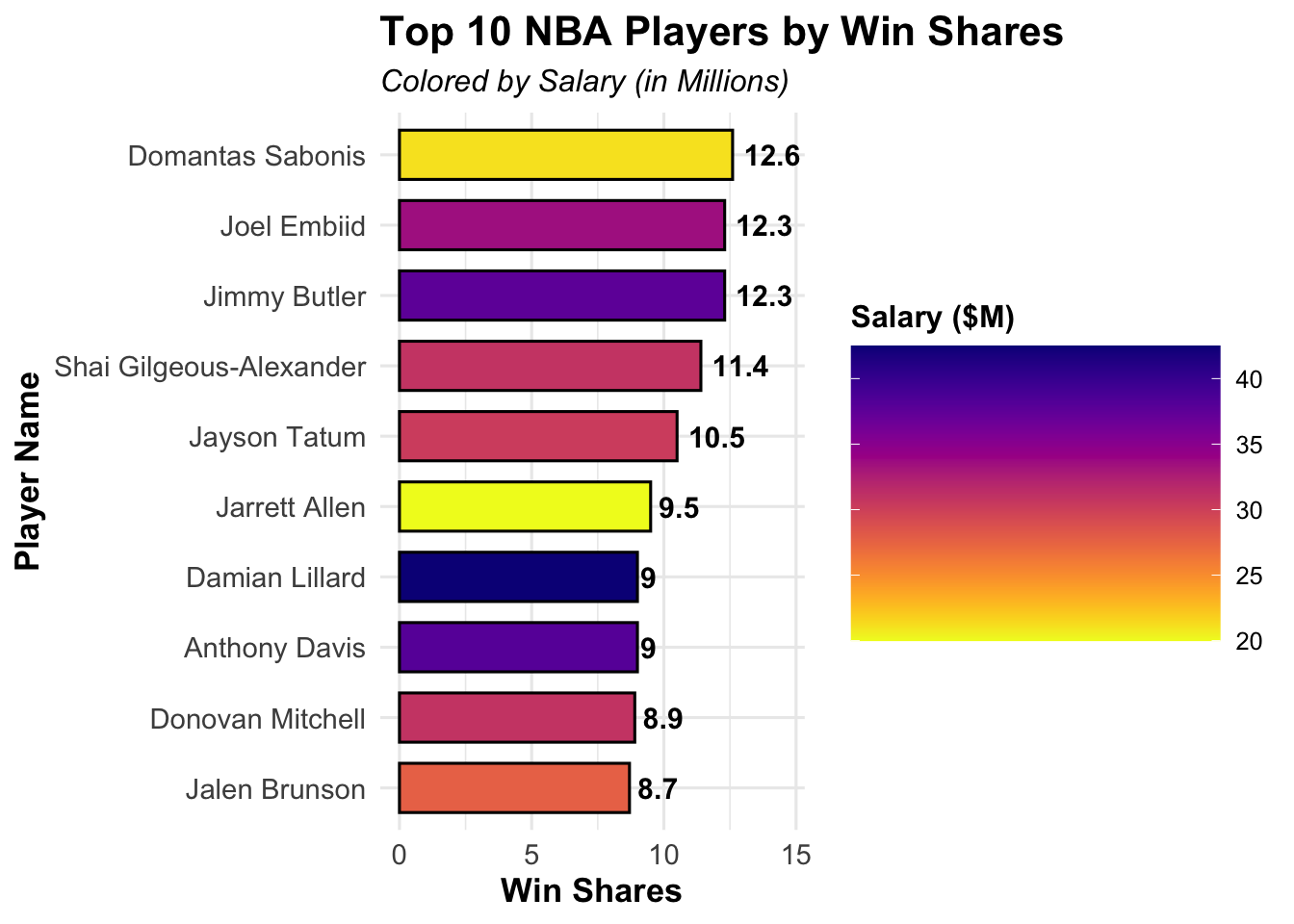
This bar chart compares the Win Shares (WS) of the top 10 players with their corresponding salaries.

# Identify top 10 players by Win Shares
top_players_ws <- nba_players_clean %>%
  arrange(desc(WS)) %>%
  slice(1:10) %>% 
  relocate(WS, .after = Salary)
print(top_players_ws)
# A tibble: 10 Γ— 52
   PlayerName    Salary    WS Position   Age Team     GP    GS    MP    FG   FGA
   <chr>          <dbl> <dbl> <chr>    <dbl> <chr> <dbl> <dbl> <dbl> <dbl> <dbl>
 1 Domantas Sab… 2.11e7  12.6 C           26 SAC      79    79  34.6   7.3  11.9
 2 Jimmy Butler  3.77e7  12.3 PF          33 MIA      64    64  33.4   7.5  13.9
 3 Joel Embiid   3.36e7  12.3 C           28 PHI      66    66  34.6  11    20.1
 4 Shai Gilgeou… 3.09e7  11.4 PG          24 OKC      68    68  35.5  10.4  20.3
 5 Jayson Tatum  3.04e7  10.5 SF          24 BOS      74    74  36.9   9.8  21.1
 6 Jarrett Allen 2   e7   9.5 C           24 CLE      68    68  32.6   5.9   9.2
 7 Damian Lilla… 4.25e7   9   PG          32 POR      58    58  36.3   9.6  20.7
 8 Anthony Davis 3.80e7   9   C           29 LAL      56    54  34     9.7  17.2
 9 Donovan Mitc… 3.09e7   8.9 SG          26 CLE      68    68  35.8  10    20.6
10 Jalen Brunson 2.77e7   8.7 PG          26 NYK      68    68  35     8.6  17.6
# β„Ή 41 more variables: FG_pct <dbl>, `3P` <dbl>, `3PA` <dbl>, `3P_pct` <dbl>,
#   `2P` <dbl>, `2PA` <dbl>, `2P_pct` <dbl>, eFG_pct <dbl>, FT <dbl>,
#   FTA <dbl>, FT_pct <dbl>, ORB <dbl>, DRB <dbl>, TRB <dbl>, AST <dbl>,
#   STL <dbl>, BLK <dbl>, TOV <dbl>, PF <dbl>, PTS <dbl>, TotalMinutes <dbl>,
#   PER <dbl>, TS_pct <dbl>, `3PAr` <dbl>, FTr <dbl>, ORB_pct <dbl>,
#   DRB_pct <dbl>, TRB_pct <dbl>, AST_pct <dbl>, STL_pct <dbl>, BLK_pct <dbl>,
#   TOV_pct <dbl>, USG_pct <dbl>, OWS <dbl>, DWS <dbl>, WS_per_48 <dbl>, …
library(ggplot2)
library(viridis)  # for prettier color gradients
Loading required package: viridisLite

Attaching package: 'viridis'
The following object is masked from 'package:scales':

    viridis_pal
library(ggthemes) # optional, for additional theme options
Warning: package 'ggthemes' was built under R version 4.5.2
# Enhanced bar chart
bar_top_ws <- ggplot(top_players_ws, aes(x = reorder(PlayerName, WS), y = WS, fill = Salary_Millions)) +
  geom_bar(stat = "identity", color = "black", width = 0.7) +
  coord_flip() +
  geom_text(aes(label = round(WS, 1)), hjust = -0.2, size = 4, fontface = "bold") +  # Add data labels
  scale_fill_viridis(option = "plasma", direction = -1, name = "Salary ($M)", guide = guide_colorbar(barwidth = 10, barheight = 8)) +
  labs(
    title = "Top 10 NBA Players by Win Shares",
    subtitle = "Colored by Salary (in Millions)",
    x = "Player Name",
    y = "Win Shares"
  ) +
  theme_minimal(base_size = 12) +
  theme(
    plot.title = element_text(face = "bold", size = 16),
    plot.subtitle = element_text(face = "italic", size = 12),
    axis.title.x = element_text(face = "bold", size = 13),
    axis.title.y = element_text(face = "bold", size = 13),
    axis.text = element_text(size = 11),
    legend.title = element_text(face = "bold"),
    legend.position = "right"
  ) +
  ylim(0, max(top_players_ws$WS) + 2)  # Add space for text labels

print(bar_top_ws)

Findings: The highest-performing players (by WS) tend to have high salaries, although there are a few exceptions. For example, Domantas Sabonis is the number one NBA player by win share, but his salary is the second lowest among top 10 players by win share. Jarret Allen is another example he is 6th in the NBA in win share yet he is being paid the lowest by any of the top 10 players by win share. This tells us that Sabonis and Allen are extremely undervalued and contribute to their teams winning percentage at a lower price compared to others in the NBA.


Offensive vs. Defensive Metrics and Salary πŸ“ˆ

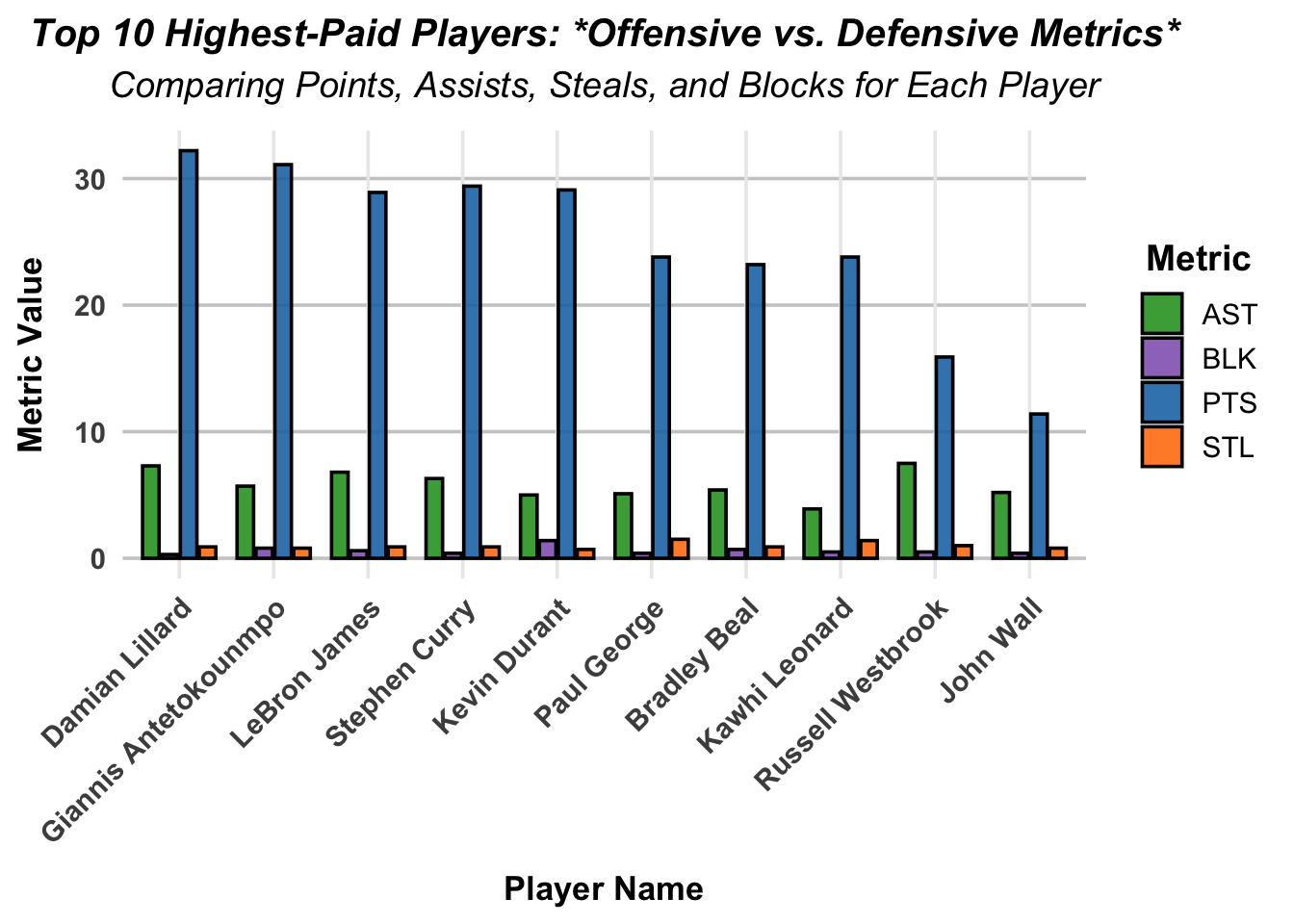
Below is a chart showing the Offensive and Defensive Metrics for the top 10 highest paid NBA players. The goal is to see which performance metrics (offensive or defensive) contribute to a players salary more.

library(tidyverse)

# Prepare data
nba_off_def <- nba_players_clean %>%
  slice_max(Salary_Millions, n = 10) %>%   # Top 10 highest-paid players
  select(PlayerName, PTS, AST, STL, BLK) %>%
  pivot_longer(cols = c(PTS, AST, STL, BLK),
               names_to = "Metric",
               values_to = "Value")

# Create grouped bar chart
grouped_bar_chart <- ggplot(nba_off_def, aes(x = reorder(PlayerName, -Value), y = Value, fill = Metric)) +
  geom_bar(stat = "identity", position = position_dodge(width = 0.8), width = 0.7, color = "black", alpha = 0.9) +
  labs(title = "Top 10 Highest-Paid Players: *Offensive vs. Defensive Metrics*",
       subtitle = "Comparing Points, Assists, Steals, and Blocks for Each Player",
       x = "Player Name",
       y = "Metric Value",
       fill = "Metric") +
  scale_fill_manual(values = c("PTS" = "#1f77b4", "AST" = "#2ca02c", 
                               "STL" = "#ff7f0e", "BLK" = "#9467bd")) +
  theme_minimal(base_size = 14) +
  theme(
    plot.title = element_text(face = "bold.italic", size = 15, hjust = 0.5),
    plot.subtitle = element_text(face = "italic", size = 14, hjust = 0.5, margin = margin(b = 10)),
    axis.title.x = element_text(face = "bold", size = 13, margin = margin(t = 10)),
    axis.title.y = element_text(face = "bold", size = 13, margin = margin(r = 10)),
    axis.text.x = element_text(angle = 45, hjust = 1, face = "bold"),
    axis.text.y = element_text(face = "bold"),
    legend.title = element_text(face = "bold"),
    legend.position = "right",
    panel.grid.major.y = element_line(color = "grey80"),
    panel.grid.minor = element_blank()
  ) +
  guides(fill = guide_legend(title.position = "top", title.hjust = 0.5))

print(grouped_bar_chart)

Findings 1. Offesive Metrics Dominate (PTS and AST)

  • Points (PTS): The PTS (light blue bars) are significantly higher for all players compared to other metrics. This suggests that scoring ability is a major factor contributing to high salaries.
    • For example, Giannis Antetokounmpo, Stephen Curry, and Damian Lillard have extremely high PTS values, indicating their scoring dominance.
    • Players like Kevin Durant and Lebron James also exhibit high PTS, reinforcing the importance of offensive capabilities.
  • Assists (AST): The AST (green bars) are the second-highest metric for most players, especially for those known as playmakers, such as LeBron James, Russell Westbrook, and Stephen Curry. This indicates that playmaking ability is another key factor in high salaries.
  1. Defensive Metrics Are Less Prominent (BLK and STL)
  • Blocks (BLK): The BLK (purple bars) are relatively low for all players, even for those known for their defensive prowess, like Kawhi Leonard and Giannis Antetokounmpo. This suggests that blocking is not a significant determinant of salary for these top players.

  • Steals (STL): The STL (orange bars) are also consistently low across all players, indicating that steals, like blocks, have less influence on salary when compared to offensive metrics.

  1. Balanced Players Are More Valued
  • Some players demonstrate a balance between offensive (PTS and AST) and defensive (STL and BLK) metrics. For example:
    • Giannis Antetokounmpo and LeBron James show relatively higher values in both offensive and defensive categories, making them versatile players.
    • Kawhi Leonard shows moderate contributions in all metrics, aligning with his reputation as a two-way player.
  1. Outliers in Specific Metrics
  • Stephen Curry: Has the highest PTS value but relatively lower defensive metrics, emphasizing his role as a scoring specialist.
  • Russell Westbrook: Shows higher AST values compared to most other players, highlighting his playmaking ability.

Key Conclusions:

  • Offensive contributions (PTS and AST) have a stronger influence on salary than defensive contributions (BLK and STL).

    • Players who excel in scoring (e.g., Curry, Durant, James) or playmaking (e.g., Westbrook, James) are more highly compensated.
  • Defensive metrics, while still important are less impactful on salary for these top players, due to the heightened difficulty to achieve higher defensive statistics although balanced players like Giannis and LeBron are exceptions.

This analysis ties the metrics back to salary by showing that offensive capabilities are the primary drivers of high compensation. - In the NBA, while being a great defensive player is important, todays fast paced, high scoring game favors players who can score a lot of points, hence the top 10 paid players all having high offensive statistics.


Interactive Scatterplot of Salary vs. True Shooting Percentage (TS%) πŸ“Š

# Load required libraries
library(tidyverse)
library(plotly)
Warning: package 'plotly' was built under R version 4.5.2

Attaching package: 'plotly'
The following object is masked from 'package:ggplot2':

    last_plot
The following object is masked from 'package:stats':

    filter
The following object is masked from 'package:graphics':

    layout
# Set a minimum threshold for total minutes played
min_minutes <- 1000

# Filter dataset to include players with at least 'min_minutes'
filtered_nba_data <- nba_players_clean %>%
  filter(TotalMinutes >= min_minutes)  # Replace 'TotalMinutes' with your actual column name

# Scatterplot: Salary vs. True Shooting Percentage (TS%)
scatter_salary_ts <- ggplot(filtered_nba_data, aes(
  x = TS_pct, y = Salary_Millions, 
  text = paste(
    "<b>Player:</b>", PlayerName, 
    "<br><b>TS%:</b>", scales::percent(TS_pct, accuracy = 0.1),
    "<br><b>Salary:</b>", scales::dollar(Salary_Millions, prefix = "$", suffix = "M"),
    "<br><b>Total Minutes Played:</b>", TotalMinutes
  )
)) +
  geom_point(color = "#1f78b4", alpha = 0.8, size = 2) +  # Blue points with transparency
  geom_smooth(method = "lm", se = FALSE, color = "#ff7f00", size = 1.2) +  # Orange trend line
  labs(
    title = "Interactive Scatterplot: Salary vs. True Shooting Percentage (TS%)",
    subtitle = paste("Players with at least", min_minutes, "Total Minutes Played"),
    x = "True Shooting Percentage (TS%)",
    y = "Salary (in Millions)"
  ) +
  scale_x_continuous(
    labels = scales::percent_format(), 
    limits = c(0.45, 0.75),
    breaks = seq(0.45, 0.75, by = .05), # Assuming TS% ranges between 40% and 70%
    expand = c(0, 0)
  ) +
  scale_y_continuous(
    labels = scales::dollar_format(prefix = "$", suffix = "M"), 
    limits = c(0, 50),  # Assuming salary ranges up to $50M
    expand = c(0, 0)
  ) +
  theme_minimal(base_size = 14, base_family = "Arial") +
  theme(
    plot.title = element_text(face = "bold", size = 16, hjust = 0.5),
    plot.subtitle = element_text(face = "italic", size = 12, hjust = 0.5, color = "gray40"),
    axis.title.x = element_text(face = "italic", size = 12),
    axis.title.y = element_text(face = "italic", size = 12),
    axis.text = element_text(size = 10),
    panel.grid.major = element_line(color = "gray80", size = 0.5),
    panel.grid.minor = element_blank(),
    legend.position = "none"
  )
Warning: Using `size` aesthetic for lines was deprecated in ggplot2 3.4.0.
β„Ή Please use `linewidth` instead.
Warning: The `size` argument of `element_line()` is deprecated as of ggplot2 3.4.0.
β„Ή Please use the `linewidth` argument instead.
# Convert the ggplot object to an interactive plot
interactive_scatter_salary_ts <- ggplotly(
  scatter_salary_ts, 
  tooltip = "text"  # Display the custom tooltip text
)
`geom_smooth()` using formula = 'y ~ x'
# Save the interactive plot as an HTML file
htmlwidgets::saveWidget(
  interactive_scatter_salary_ts, 
  "interactive_scatter_salary_ts_filtered_minutes.html", 
  selfcontained = TRUE
)

# Print the interactive plot to view in RStudio
interactive_scatter_salary_ts

Above is an interactive plot showing the relationship between True Shooting Percentage and Player Salaries.

Significance of the Project πŸ”Š

Why These Findings Matter

The insights uncovered in this project go beyond basketball and can be applied to several real-world scenarios:

  1. Influencing Business Decisions in Sports:
    • Salary Optimization: Teams can use the findings to identify undervalued players whose contributions (e.g., high PER or WS) exceed their current salaries. This can guide better salary negotiations and resource allocation.
    • Player Evaluation: By understanding which metrics (e.g., offensive contributions like PTS and AST) strongly influence salaries, teams can refine their scouting and recruitment strategies to focus on high-impact players.
    • Data-Driven Contracts: Teams can use this analysis to structure contracts that better reflect a player’s overall value, balancing offensive and defensive contributions.
  2. Broader Applications Beyond Sports:
    • Workforce Compensation Analysis: Just as we analyzed player salaries, organizations in other industries can use data to ensure fair and performance-based compensation for employees.
    • Influencing Public Policy: The methodology of linking measurable performance metrics to pay could also be applied in sectors like education, healthcare, and public services to assess resource allocation and equity.
  3. Enhancing Fan Engagement:
    • Fans love debating whether players are underpaid or overpaid. This analysis provides a data-backed framework for fans, sports journalists, and commentators to discuss player value and team-building strategies.

Connecting to Broader Themes

  • Data-Driven Decision-Making: This project underscores how data can lead to more informed, fair, and efficient decisions in any industry.
  • Value Assessment: By identifying inefficiencies and patterns in compensation, we can promote better allocation of resources, whether in sports or other fields.

References

Data Sources

  1. NBA Dataset: Source
    • Contains player performance metrics and salary data for the 2022-23 NBA season.

AI Assistance

This project benefited from the use of GitHub Copilot, a code-generation and AI assistant tool.

GitHub Copilot was employed to:

  • Refine code aesthetics, such as improving themes, scales, and formatting for better presentation.

  • Provide insights and guidance on implementing project-specific requirements (e.g., filtering datasets, embedding interactive visualizations).

  • Answer technical questions and suggest best practices for reproducible and professional code.

  • Help to refine errors and troubleshoot incorrect code.

GitHub Copilot facilitated faster implementation and enhanced the overall quality of the project by offering suggestions and reducing development time.

Note: All outputs from GitHub Copilot were reviewed and validated by the project team to ensure accuracy and relevance to the project goals.